






















Options Advanced mode

The advanced options are only shown when the installer mode is set to "Advanced." This section allows users to change or set advanced options, configure additional database settings and set other configuration options in the wp-config.php file.

Advanced Tab

These are the advanced options for advanced users.
Option Details
Processing
Extraction
Mode
Manual Archive Extraction
Set the Extraction value to "Manual Archive Extraction" when the archive file has already been manually extracted on the server. This can be done through your host's control panel such as cPanel or by your host directly. This setting can be helpful if you have a large archive file or are having issues with the installer extracting the file due to timeout issues.

PHP ZipArchive
This extraction method will use the PHP ZipArchive code to extract the archive zip file.

PHP ZipArchive Chunking
This extraction method will use the PHP ZipArchive code with multiple execution threads to extract the archive zip file.

Shell-Exec Unzip
This extraction method will use the PHP shell_exec to call the system unzip command on the server. This is the default mode that is used if it's available on the server.

DupArchive
This extraction method will use the DupArchive extractor code to extract the daf-based archive file.
Server
Throttling
If the current host is a budget host that monitors CPU usage, then users might want to consider checking this box to help slow down the process and not kick off any high-usage monitors.
Extraction Flow
Archive Action Extract files over current files
The existing site files will be overwritten with the contents of the archive.zip/daf.

Pro Remove WordPress core and content and extract
The existing WordPress core files and WordPress content directory will be removed, and then the archive will be extracted.

Pro Remove all files except add-on sites and extract
All files except an add-on site will be removed, and then the archive will be extracted. An add-on site is a site/domain that is stored in a directory off of your main site that has been "added on" to your main hosting account. For instance, when you purchased a hosting account it could be for a.com. Then after that, you decided to add b.com and c.com to the same hosting account. The structure of this setup is often the following although it can vary some:
  • /public_html - contains files for a.com
  • /public_html/b.com - contains files for b.com
  • /public_html/c.com - contains files for c.com
The directories /public_html/b.com and c.com contain the files for the add-on sites b.com and c.com (so the option above means that b.com and c.com would be preserved and not deleted when you installed to a.com)
Skip Files Extract all files
Extract all files from the package archive. This option is selected by default.

Pro Skip extraction of WordPress core files
Extract all files except WordPress core files. Choose this option to extract only the wp-content folder and other non-core WordPress files and directories.

Pro Skip extraction of WordPress core files and plugins/themes existing on host
Extract all files except WordPress core files and existing plugins/themes on the current host.

Pro Extract only media files and new plugins and themes
Extract all media files, new plugins, and new themes. The installer will not extract plugins and themes that already exist on the destination site.
File Times When the archive is extracted it should show the current date-time or keep the original time it had when it was built. This setting will be applied to all files and directories. Note: Setting the Original time is currently only supported when using the ZipArchive Format.
File
Permissions
Switch on and set permissions in either octal or symbolic values to assign permissions to files. This option is not available on Windows machines.
Directory
Permissions
Switch on and set permissions in either octal or symbolic values to assign permissions to directories. This option is not available on Windows machines.
Configuration Files
WordPress
wp-config
Do nothing
This option simply does nothing. The wp-config file does not get backed up, renamed, or created. This advanced option assumes you already know how it should behave in the new environment. This option is for advanced technical persons.

Modify original
This is the default recommended option which will modify the original wp-config file.

Create new from wp-config sample
This option creates a new wp-config file by modifying the wp-config-sample.php file. The new wp-config.php file will behave as if it was created in a fresh, default WordPress installation.

Apache
.htaccess
Do nothing
This option simply does nothing. The .htaccess is not backed up, renamed, or created. This advanced option assumes you already have your .htaccess file set up and know how it should behave in the new environment. When the package is built it will always create an .htaccess file at this location: /dup-installer/original_files_[HASH]/.htaccess Since the file is already in the archive file it will show up when the archive is extracted.

Retain original from Archive.zip/daf
This option simply copies the /dup-installer/original_files_[HASH]/.htaccess file to the .htaccess file. Please note this option will cause issues with the install process if the .htaccess is not properly set up to handle the new server environment. This is an advanced option and should only be used if you know how to properly configure your .htaccess configuration.

Create New
This is the default recommended option which will create a new .htaccess file. The new .htaccess file is streamlined to help guarantee no conflicts are created during install.

Notes: Inside the archive.zip or archive.daf will be a copy of the original .htaccess (Apache) file that was set up with your packaged site. The .htaccess file is copied to /dup-installer/original_files_[HASH]/source_site_htaccess. When using either "Create New" or "Retain original from Archive.zip/daf" an existing .htaccess file will be backed up to a /wp-content/backups-dup-lite/installer/original_files_[HASH]/source_site_htaccess. This change will not made until the final step is completed, to avoid any issues the .htaccess might cause during the install
General
php.ini, .user.ini,
web.config
OVERVIEW
When the archive is built it will always create an original backup of the php.ini, .user.ini, and web.config files ("Config Files") if they exist. The backups will be in the following location within the archive file without an extension. Original File Backups
archive.zip|daf/dup-installer/original_files_[HASH]/[location]_phpini
archive.zip|daf/dup-installer/original_files_[HASH]/[location]_userini
archive.zip|daf/dup-installer/original_files_[HASH]/[location]_webconfig
If there are "Config Files" on the new server, backups may also optionally be created. Backup [location] is defined by the following:
  • source_site Backup of original file when the archive was created on the source host
  • installer_host Backup of original file before the installer starts on active host

ACTIONS
Do nothing
This option performs no actions and assumes you already have your configuration files set up properly; either on the server or in the archive. If the same "Config Files" exist in both the deploy directory and the archive, then the archive files will overwrite any configuration files that exist at the same location in the archive.


Retain original from Archive.zip/daf
  1. Moves any existing "Config Files" on the new host to the following location: /dup-installer/original_files_[HASH]/installer_host_[CONFIG-TYPE]
    An existing "Config File" resides on the server before the archive is extracted or step 1 is ran.
  2. The installer last step copies all "Config Files" from the archive backups to the correct location on the new host. They are copied from this location:
    /dup-installer/original_files_[HASH]/source_site_[CONFIG-TYPE]

Reset
  1. Moves any existing "Config Files" on the new host to the following location: /dup-installer/original_files_[HASH]/installer_host_[CONFIG-TYPE]
    An existing "Config File" resides on the server before the archive is extracted or step 1 is ran.
  2. If any "Config Files" already exist in the archive they will be deployed "as is" to the location that matches the archive file structure.
General
Logging The level of detail that will be sent to the log file (installer-log.txt). The recommended setting for most installs should be "Light." Note if you use Debug the amount of data written can be very large. Debug is only recommended for support.
Cleanup Pro Remove disabled plugins/themes
Remove all inactive plugins and themes when installing site. Inactive users will also be removed during subsite to standalone migrations.

Pro Remove users without permissions
Removes users that currently do not have any permissions associated with their accounts.
Safe Mode Safe mode is designed to configure the site with specific options at install time to help overcome issues that may happen during the install where the site is having issues. These options should only be used if you run into issues after you have tried to run an install.

Disabled
This is the default. This option will not apply any additional settings at install time.

Enabled
When enabled the safe mode option will disable all the plugins at install time. Note: When this option is set you will need to manually re-enable the plugins that need to be enabled after the install from the WordPress admin plugins page.


Database Tab

These are the advanced options for database configuration.
Option Details
Table Prefix Pro This option allows changing the table prefix to other than the package creation site's table prefix. The table prefix is the value placed in the front of your database tables. It is possible to have multiple installations in one database if you give each WordPress site a unique prefix.
Mode Modes affect the SQL syntax MySQL supports (and others such as MariaDB) . This setting performs various data validation checks. This makes it easier to use MySQL in different environments and to use MySQL together with other database servers. It is very useful when running into conversion issues. The following options are supported:
  • Default: This is the recommended setting to use. It will use the current Database mode setting.
  • Disable: This will prevent the database engine from running in any mode.
  • Custom: This option will allow you to enter a custom set of mode commands. See the documentation link below for options.
For a full overview please see the MySQL mode and MariaDB mode specific to your version. To add a custom setting enable the Custom radio button and enter in the mode(s) that needs to be applied.
Processing Chunking mode
Split the work of inserting data across several requests. If your host throttles requests or you're on a shared server that is being heavily utilized by other sites then you should choose this option. This is the default option.

Single step
Perform data insertion in a single request. This is typically a bit faster than chunking, however it is more susceptible to problems when the database is large or the host is constrained.
Create Run all CREATE SQL statements at once. This option should be checked when source database tables have foreign key relationships. When choosing this option there might be a chance of a timeout error. Uncheck this option to split CREATE queries in chunks. This option is checked by default.
Objects Allow or Ignore objects for "Views," "Stored Procedures," "Functions" and "DEFINER" statements. Typically the defaults for these settings should be used. In the event you see an error such as "'Access denied; you need (at least one of) the SUPER privilege(s) for this operation" then changing the value for each operation should be considered.


URLs & Paths Tab Pro

In the tab "URLs & Paths," you can read the current path of all the various path configurations for the WordPress site. These are advanced options that should only be edited if you know the correct path. These options are editable in the Pro version. These paths and URLs are set automatically by the package installer. You can set these paths and URLs manually. If you are changing it, please make sure you are putting the right path or URL.


Fire on Amritsar–Saharsa Garib Rath Express Near Sirhind
Home News A Close Call – Fire Erupts on Amritsar–Saharsa Garib Rath Express Near...

A Close Call – Fire Erupts on Amritsar–Saharsa Garib Rath Express Near Sirhind

0
891
A Close Call - Fire Erupts on Amritsar–Saharsa Garib Rath Express Near Sirhind

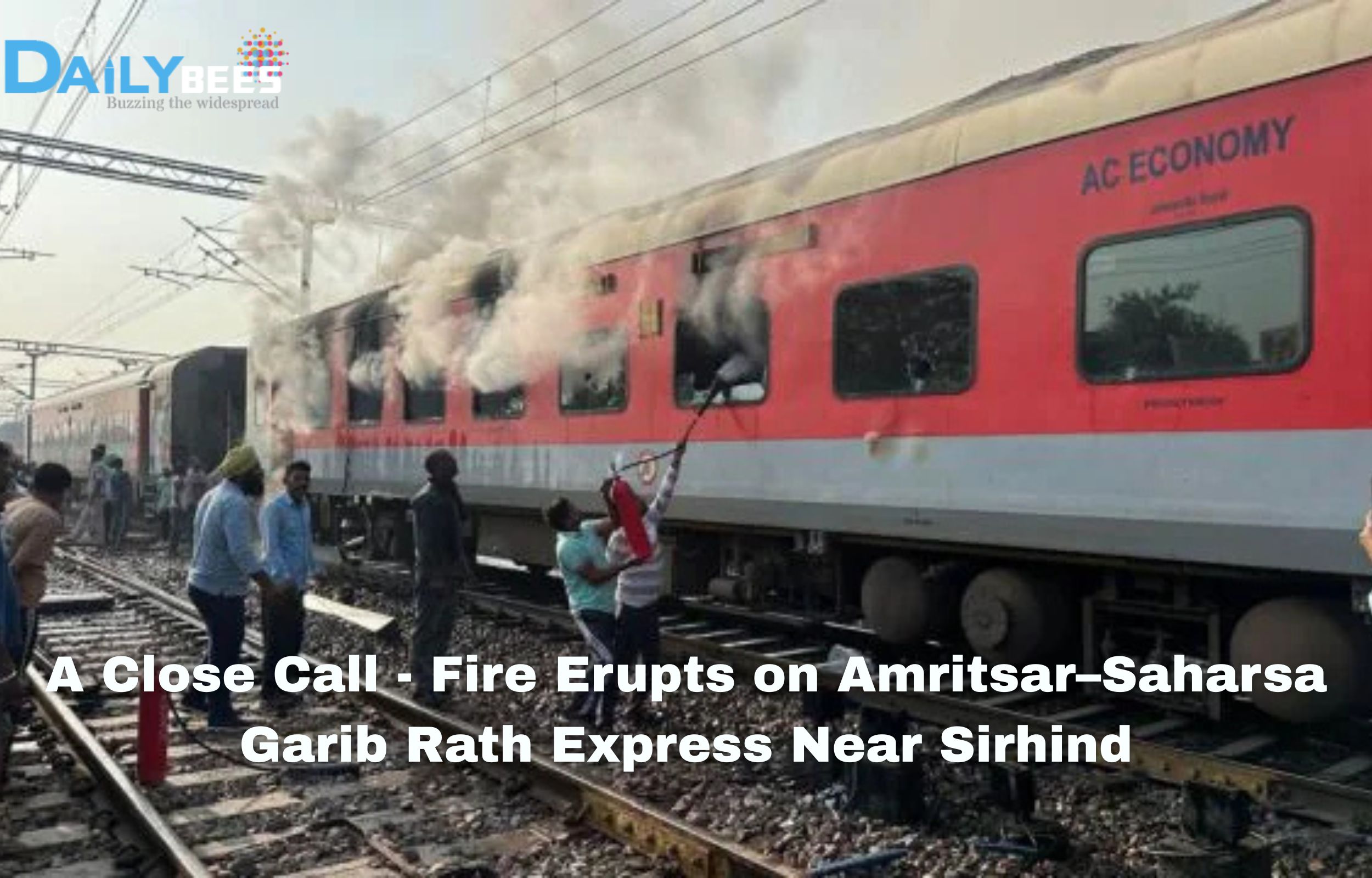
On Saturday morning, around 7:30 a.m., a fire broke out in an air-conditioned coach of the Amritsar to Saharsa Garib Rath Express (Train number 12204) as it approached Sirhind railway station in Fatehgarh Sahib district, Punjab.

Smoke was detected coming from coach G-19, prompting a passenger to pull the emergency chain. The train was brought to a stop immediately.

Evacuation & response

Passengers in the affected coach were quickly evacuated by railway and GRP (Government Railway Police) officials and moved into other coaches. Two adjacent coaches also sustained minor damage. Fire-tenders reached the scene and brought the blaze under control before it could spread further.

Casualties & damage

Fortunately, there were no major casualties. One woman, aged 32, sustained minor burn injuries and was taken to the Civil Hospital in Fatehgarh Sahib for treatment.

The three involved coaches—the one where fire broke out and two adjacent ones—were detached from the train to prevent further risk.

What happens next?

Railway authorities say the cause of the fire is under investigation. The train remains stationary near Sirhind as safety checks are carried out.

Officials emphasize that the swift response averted what could have been a “major mishap”.

Context and significance

The Garib Rath series is a budget AC-3 tier train service by Indian Railways aimed at providing air-conditioned travel at more affordable fares. The Amritsar–Saharsa Garib Rath connects key northern and eastern regions, covering Punjab, Haryana, and Bihar.

Given the large number of long-distance travellers using such trains, a fire in an air-conditioned coach is especially concerning, because:

  • AC coaches involve integrated electrical and air-conditioning systems, increasing fire risk if equipment fails.
  • Fires can escalate quickly in enclosed coach environments.
  • Evacuation is more complex when trains are moving, especially at speeds or in remote sections.

In this incident, the fact that the fire was detected early, the chain pulled, and evacuation executed swiftly, all contributed to preventing greater harm.

What went right and what needs review

What went right:

  • Passengers or staff noticed smoke and acted quickly (pulling the alarm chain) which is a critical first step.
  • The train was brought to a halt before the situation worsened.
  • Evacuation from the affected coach and movement of passengers to safe coaches happened smoothly.
  • Firefighting services were mobilised and the threat contained.

What needs review:

  • The cause of the fire remains unknown; identifying whether it was electrical failure, HVAC malfunction, external spark or human error is essential.
  • Why did the smoke detection or alarm not prompt earlier action from staff? There may be gaps in monitoring or early warning systems.
  • Were the fire-safety mechanisms (extinguishers, coach fire-retardant materials, emergency exits) in optimal condition?
  • How effective was communication to passengers during evacuation? Long-distance night trains may have sleeping passengers who may be disoriented.
  • The train had to be stationed for checks—this suggests potential delays for a large number of travellers; systems need to account for minimal disruption while ensuring safety.

Rail safety in India: broader perspective

Fires on trains, while less common than derailments, are among the most feared incidents because they can trap passengers in confined spaces and spread rapidly. Indian Railways has in recent years taken several initiatives:

  • Phasing in of LHB (Linke-Hofmann-Busch) coaches that are fire-resistant and have improved safety features.
  • Upgrading old wiring, AC systems, and fire-detection systems.
  • Regional drills for firefighting response and evacuation at stations and along routes.
  • Clearer protocols for passengers on how to react in emergencies (pulling alarm chains, moving to safe coaches, etc.).

Nevertheless, this incident serves as a reminder that even major routes—one carrying a long-distance premium AC train remains vulnerable to sudden fire risks.

Voices from the scene

Passengers and local responders described tense moments after the smoke was seen. According to reports:

“We heard crackling and then saw smoke coming from the roof of the coach. Suddenly the chain was pulled and in minutes the train stopped. We moved to the next coach and the staff was directing us. Passenger on the train reported the same.

Station and police officials said swift coordination between the GRP, station staff and fire-services made the difference.

The route and timing: why this location mattered

The incident took place near Sirhind station in Punjab, as the train was nearing the end of the Ludhiana – Ambala section. Because the fire occurred while the train was still in a relatively busy railway zone (compared to remote stretches), the chances of prompt response were higher.

Moreover, the time—early morning—meant many passengers were awake or in transit; miracles often happen when incidents strike during deep night hours when evacuation is more difficult.

Impact on passengers and services

  • Immediate disruption: The train had to be stopped, coaches separated and safety checks done, likely causing delays for passengers en route to Saharsa.
  • Psychological impact: Though no major injuries occurred, the scare of fire in a moving train is significant, and trust in safety systems may be shaken.
  • Operational cost: Damaged coaches will require inspection, repair or replacement, affecting rail operations and scheduling.
  • Safety audit trigger: The incident is likely to trigger a fresh audit of AC coach safety across Garib Rath trains and long-distance AC services.

What passengers should do to stay safe

For travellers on long-distance AC trains, this incident highlights a few practical steps:

  1. Familiarise yourself with emergency procedures: Locate the alarm chain/handle. Know how to respond if directed by staff.
  2. Note the coach number: In this case coach G-19 was affected; knowing your coach number helps in evacuation.
  3. Keep personal items accessible: Valuables, medicines, phone should ideally be within reach. In an emergency, you’ll evacuate fast.
  4. Don’t panic, follow instructions: Staff are trained for emergencies; following their direction helps orderly evacuation.
  5. Report early signs: If you spot smoke, spark or smell something burning, alert staff immediately. Early detection saves lives.

Looking ahead: key questions for Indian Railways

  • What was the cause of the fire? Until this is established, similar risks remain unresolved.
  • Are all AC coaches across Garib Rath services equipped with functioning fire-detection systems?
  • What percentage of coaches still uses older wiring or equipment prone to short-circuit or malfunction?
  • Can passenger awareness programmes be increased? More travellers need to know how to act quickly (pull chain, move coaches, etc.).
  • What are the maintenance intervals for fire-safety equipment and how rigorously enforced are they?
  • In the longer term, will Indian Railways accelerate replacement of older coach stock with newer, safer ones for long-distance AC services?

Conclusion

What could easily have turned into a major tragedy was averted thanks to swift detection, swift action by passengers and staff, and rapid firefighting response near Sirhind. While this incident ends without loss of life—which must be the immediate relief—the question now shifts to ensuring that the safety systems which worked this time are robust enough to work every time.

For the thousands of passengers who travel daily on AC long-distance trains such as the Garib Rath series, this event is a reminder that safety is collective: infrastructure, maintenance, staff training and passenger vigilance together determine outcomes. As investigations proceed, Indian Railways will have to demonstrate that lessons are learned, vulnerabilities are closed, and passengers can trust that journeys remain safe even when the unexpected strikes.